Adding Metadata
CLU supports multiple metadata provides that can be configured per library. Search any or all of them in your preferred order when adding metadata to your files.
Overview
CLU supports multiple metadata providers for populating your files with ComicInfo.xml metadata. Providers can be enabled per library with configurable priority ordering — CLU iterates through providers in order and applies metadata from the first provider that returns a result.
| Provider | Status | Description |
|---|---|---|
| Metron | Metron Comic Book Database | |
| ComicVine | ComicVine Database | |
| GCD API | Grand Comics Database API | |
| GCD | Grand Comics Database (requires local setup) | |
| MangaDex | MangaDex Database | |
| MangaUpdates | MangaUpdates Database | |
| Bedetheque | Bedetheque Database (Future Implementation) |
If you have enabled GCD Database Support you'll see an additional icon in the File Manager for searching your local GCD Database for Metadata.
Warning
While not as thorough as ComicVine, the GCD database offers a quick way to get metadata for a large collection.
Configuration
Navigate to Settings > Metadata Providers tab to add, edit, test, and remove provider credentials. Save and test each connection before use — a green checkmark confirms successful connectivity.
Ensure you also enable the metadata provider(s) for the library you are working with. See Settings > Libraries for more information.
CVINFO File and Creation
If you have used Mylar3 to download comics, it adds a cvinfo file when you add a series. This file contains the ComicVine ID of the series, which CLU can use to search for metadata from ComicVine.
To enable this functionality for series created outside of Mylar3, you can create a cvinfo file in the same directory as the comic by clicking the Add CVINFO button.
CLU will also create a cvinfo file if you use the Subscribe to Series feature and when retrieving metadata for a folder.
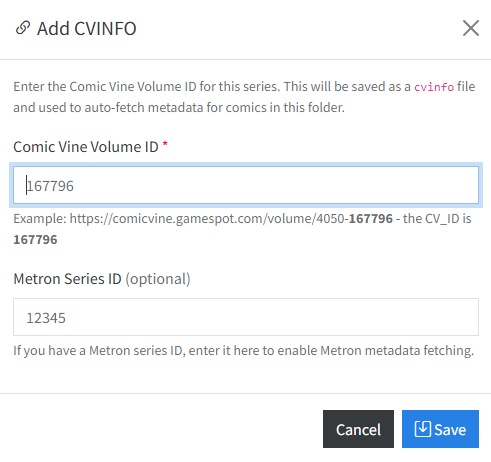
This will open a modal window where you can add the ComicVine ID of the series as well as the Metron ID of the series.
Metadata Added on File Move
If enabled, when you move a file to a new location the metadata will be applied automatically if the following criteria are met:
- There is a valid
cvinfofile in the same directory - There is no
ComicInfo.xmlfile OR if theComicInfo.xmlfile was generated from Amazon data, it will be replaced.
File Renamed when Metadata is Added
If this feature is enabled, when a ComicInfo.xml file is generated, the file will be renamed to match your configured Custom Rename Pattern based on the data in the ComicInfo.xml file.