ComicVine Metadata
If you have entered a Commicvine API Key in settings, you'll see an additional icon in the File Manager. Clicking the icon will beging searching for metadata from ComicVine.
Single Issue Metadata Only
The ComicVine feature only searches for metadata for a single issue. If you have multiple issues in a directory, you will need to use the GCD Database Method feature to process multiple issues. ComicRackCE should be your first choice for performing large metadata updates if you want to use ComicVine.
CVINFO File and Creation
If you use Mylar3, it adds a cvinfo file when you add a series. This file contains the ComicVine ID of the series, which CLU can use to search for metadata from ComicVine. To enable this functionality for series created outside of Mylar3, you can create a cvinfo file in the same directory as the comic by clicking the Add CVINFO button.
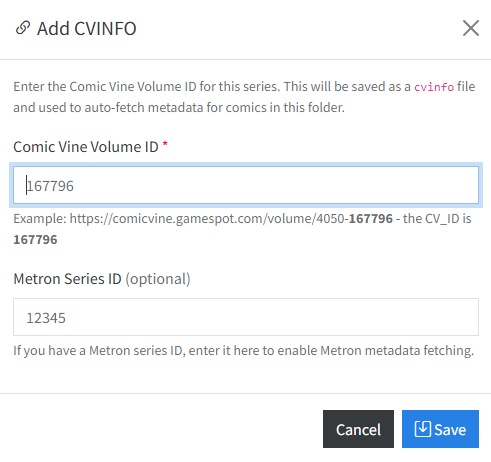
This will open a modal window where you can add the ComicVine ID of the series as well as the Metron ID of the series. The Metron ID is optional and will only be used if you have enabled the Metron Metadata feature.
Manually Search for Metadata
Clicking the will begin searching for metadata from ComicVine. If there are multiple matches, a modal will open, prompting you to select the correct match. If there is only one match, the metadata will be applied automatically.
Additional ComicVine Settings

Additional settings can be found in the Metadata Settings.
Metadata Added on File Move
If enabled, when you move a file to a new location the metadata will be applied automatically if the following criteria are met:
- There is a valid
cvinfofile in the same directory - There is no
ComicInfo.xmlfile
File Renamed when Metadata is Added
If this feature is enabled, when a ComicInfo.xml file is generated by ComicVine, the file will be renamed to match your configured Custom Rename Pattern.