Library & Folder Access
Access is granted in two layers, so you can be as broad or as precise as you like.
- Library grants are the outer gate — which libraries an account may see at all.
- Folder grants refine access within a granted library.
Both are set in the user modal — see Managing Users.
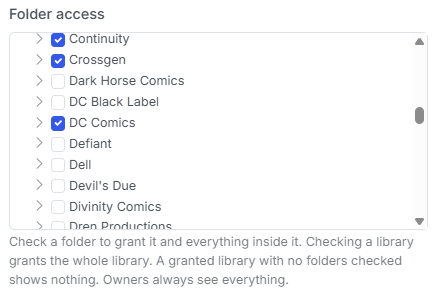
The folder tree in the user modal. Checking a folder grants it and everything inside it.
The rules
- New non-owner accounts are granted nothing. Default-deny, deliberately. A brand-new Reader sees an empty library until you grant something.
- A granted library with no folders checked shows nothing. The library grant alone is not access — it only makes the library eligible.
- A folder grant covers that folder and all of its descendants. Nested inheritance is automatic; you never have to check children individually. Checking the library root grants the whole library.
- Ancestor folders are traversable, but not readable. If you grant
/data/Comics/Marvel/Daredevil, the user can walk down through/data/Comicsand/data/Comics/Marvelto reach it. Siblings they weren't granted stay hidden, and an ancestor alone never allows opening a file. - Store Owners bypass all of it and always see everything.
Scenario → what the user sees
| Scenario | What the user sees |
|---|---|
| Library not granted | The library does not appear at all. Direct paths into it return 403. |
| Library granted, no folders checked | The library appears but is empty. Nothing inside it can be opened. |
| A subfolder granted | That folder and everything beneath it, in full — browse, covers, reader, download. |
| An ancestor of a grant | The ancestor is navigable so the user can reach the grant below it. Ungranted siblings inside it are hidden, and files sitting directly in the ancestor cannot be opened. |
| Library root granted | The entire library. |
| Store Owner | Everything, regardless of grants. |
Enforcement is not just a UI filter
Two independent mechanisms are in play, and both are active:
- Listing filtering — anything the user isn't granted never appears in a response.
- Path guarding — a hand-typed path into an ungranted area is rejected with 403, even though nothing in the UI offered it.
Path guarding covers browse, search, recent files, thumbnails, covers, the reader, downloads, the metadata browser, OPDS, and /api/v1. A Reader or Clerk API token is scoped to its user's grants, so it cannot reach files the person behind it cannot reach in the browser.
Recently Added respects grants too
Dashboard surfaces that pull from across the library — Recently Added in particular — are filtered to the folders the user has been granted, so nobody stumbles onto something you have not shared with them.
A worked example
You have one library at /data/Comics, containing Marvel, DC, and Mature.
To give a Reader everything except Mature:
- Grant them the
/data/Comicslibrary. - In folder access, check
MarvelandDC— but notMature, and not the library root.
They now see Marvel and DC in full. Mature is invisible in listings, and typing its path returns 403.