Adding AirDC++
You add AirDC++ from the Download Clients tab in Settings, the same place Usenet clients live.
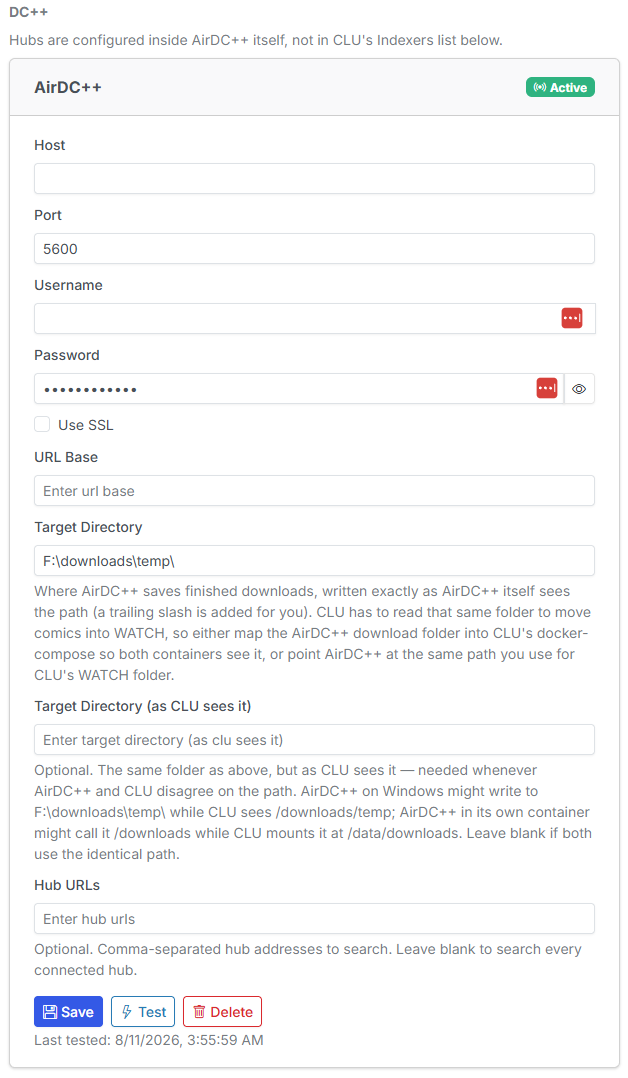
Settings → Download Clients, with an AirDC++ client configured alongside an active SABnzbd.
AirDC++ does not deactivate your Usenet client
Download clients now belong to a group — usenet or dcpp — and the "only one active client" rule is scoped per group. Activating AirDC++ leaves SABnzbd or NZBGet active and untouched. See Download & API Settings.
Fields
| Field | Meaning | Example |
|---|---|---|
| Host | Hostname or IP where the AirDC++ Web Client is running. | 192.168.1.10 or airdcpp |
| Port | The AirDC++ Web Client port. | 5600 |
| Use SSL | Tick if your instance is served over HTTPS. | unticked |
| URL Base | Optional path prefix, if AirDC++ sits behind a reverse proxy on a subpath. | /airdcpp |
| Username | An AirDC++ Web Client user with API access. | clu |
| Password | That user's password. | |
| Target Directory | Where AirDC++ should write completed bundles, expressed the way AirDC++ sees it. | /downloads/comics/ |
| Local Target Directory | That same folder, expressed the way CLU sees it. | /downloads/comics |
| Hub URLs | Optional. Restrict searches to specific hubs; leave empty to search every connected hub. |
Two different paths
Two different paths
Target Directory and Local Target Directory point at the same folder on disk, but they are written from two different points of view — and they are usually not the same string.
- Target Directory is the path AirDC++ uses to write the file. AirDC++ receives this value and hands it to its own filesystem.
- Local Target Directory is the path CLU uses to find that file afterwards, so it can move it into WATCH.
AirDC++ normally runs natively on the host or in its own container, so its filesystem is not CLU's filesystem. If you enter CLU's path in both boxes, AirDC++ will write somewhere CLU cannot see — or somewhere that does not exist — and downloads will complete but never reach your library.
The fix is a shared volume: map the folder AirDC++ downloads into your CLU container (in CLU's docker-compose.yml), then put the AirDC++-side path in Target Directory and the CLU-side path in Local Target Directory. Using CLU's existing WATCH folder for both sides is a perfectly good option if you can mount it into AirDC++.
Test Connection
Click Test Connection after entering your details. CLU calls the instance live and reports a readable result.
| Result | Meaning | What to check |
|---|---|---|
| Connected | CLU reached AirDC++, authenticated, and could open the local target directory. | Nothing — you're good. |
| Could not connect | Nothing answered at that host/port. | Host, port, SSL setting, and that AirDC++ is reachable from CLU's container. |
| Authentication failed | AirDC++ answered but rejected the credentials. | Username and password. |
| Non-JSON response | Something answered, but it wasn't the AirDC++ API. | You are probably pointed at the wrong port, a reverse proxy, or a login page. |
| Timed out | No response in time. | Network path, firewall, or an overloaded instance. |
| Target Directory is not a valid path on the AirDC++ host | The path shape doesn't match the host's separator. | See Path separators below. |
| CLU cannot see '…' | The Local Target Directory isn't a real directory inside CLU's container. | Your volume mapping — the folder AirDC++ downloads into has to be mounted into CLU. |
Test Connection tests what's on screen
Test Connection validates the values currently in the form, not the last saved configuration. You can correct a field and verify the fix before committing it.
Path separators
AirDC++ does not reject a target directory it cannot parse — it silently folds the whole path into the filename. On a Windows host, / is a forbidden filename character rather than a separator, so a POSIX target directory like /downloads/temp/ turns a grab into a single file called _downloads_temp_Farmhouse 007.cbr sitting in AirDC++'s own default download folder. A Windows-style path on a Linux host fails the same way.
CLU reads the host's actual separator from the instance and refuses a target directory it can't parse, with a message naming the fix, rather than letting it through and producing mangled filenames.
CLU also appends the trailing separator AirDC++ expects, so you don't have to — /downloads/comics and /downloads/comics/ both work.
Change the path, re-test
Because this check depends on the AirDC++ host's own separator, it can only be validated against a live instance. Re-run Test Connection any time you change either directory.