Notifications
New in v6.4
CLU can now send push notifications when a download completes, a download fails, or wanted issues land in your library.
Before v6.4, the only feedback CLU could give you was an in-app toast — which is local to the process, expires after 300 seconds, and requires you to be looking at the browser tab. If you weren't watching, nothing told you anything had happened.
Notifications are built on Apprise, which turns a single URL into a delivery target. One dependency, one URL scheme, and over a hundred services behind it.
Open Settings → Notifications.
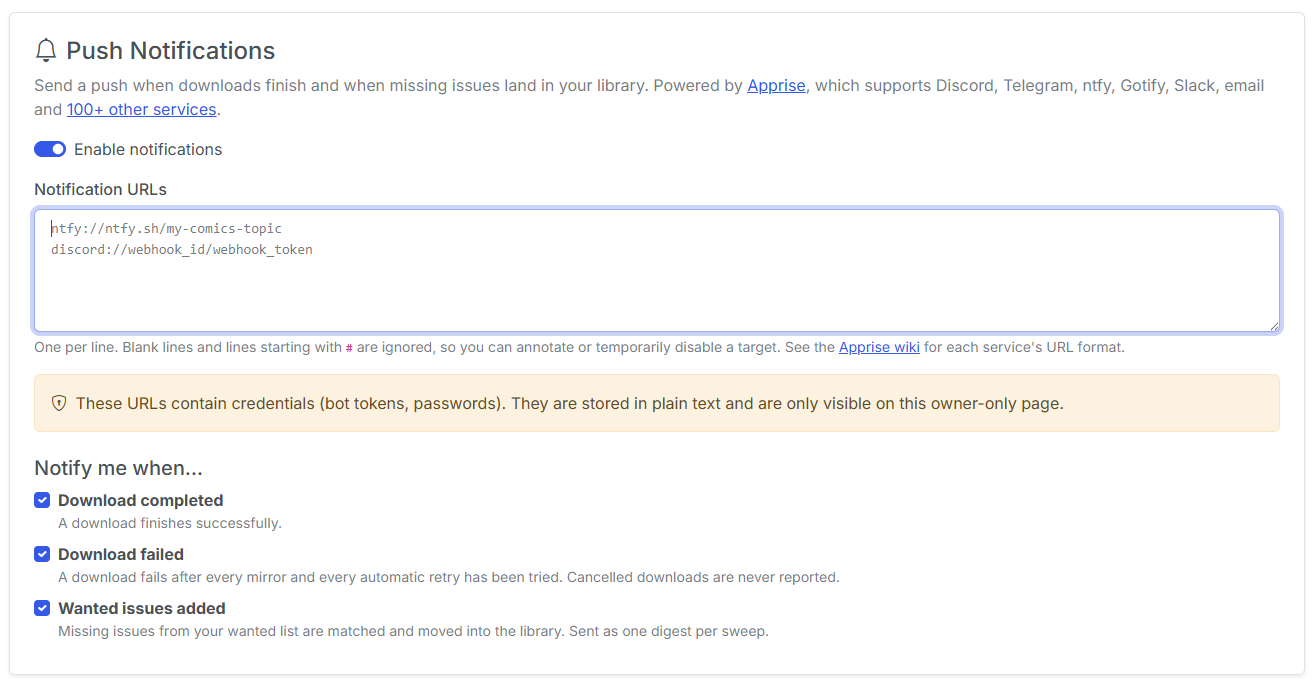
Setting it up
1. Turn notifications on
The master Enable Notifications switch gates everything. With it off, nothing is sent regardless of what else is configured — useful for silencing pushes temporarily without losing your setup.
2. Add one or more notification URLs
Enter one URL per line. Every URL receives every enabled event, so you can push to Discord and your phone at the same time.
A few common schemes:
| Service | URL format |
|---|---|
| Discord | discord://webhook_id/webhook_token |
| Telegram | tgram://bot_token/chat_id |
| ntfy | ntfy://topic or ntfys://user:pass@host/topic |
| Gotify | gotify://hostname/token |
| Pushover | pover://user_key@token |
| Slack | slack://token_a/token_b/token_c |
mailto://user:password@gmail.com |
|
| Home Assistant | hassio://hostname/access_token |
The full list — over a hundred services — is in the Apprise URL documentation. If Apprise supports it, CLU supports it.
Comment out a URL instead of deleting it
Lines beginning with # are ignored. Handy for parking a target you want back later.
3. Pick your events
| Event | Fires when |
|---|---|
| Download completed | A download finishes successfully — from GetComics, Pixeldrain, MEGA, ComicBookPlus, Usenet, or DC++. |
| Download failed | A download is genuinely dead — see Failures wait for the retries below. |
| Wanted issues found | Wanted issues were matched and imported into your series folders. One digest per sweep, not one push per issue. |
Untick an event and it stops firing, without touching your URLs.
4. Send a test
Send Test Notification pushes a message to every configured URL right now, and reports back per URL. Use it before you rely on the setup — a typo in a webhook token is otherwise invisible until the moment you needed the notification.
Notification URLs contain credentials
Apprise URLs embed bot tokens, webhook secrets and SMTP passwords. They are stored and displayed in plaintext, the same way existing provider API keys are.
They are redacted before anything reaches the App Logs, so a debug package will not leak them. Treat the Notifications tab itself as sensitive — in a multi-user install, only the Store Owner can reach it.
How notifications behave
Cancelling a download never notifies you
Aborting a transfer is how a cancel surfaces from most providers, so internally the failure path runs for cancels too. The notification deliberately sits after the cancel guard, so a download you cancelled yourself won't push you a failure notice.
Failures wait for the retries
As of v6.4, a failed download is automatically retried up to 3 times, spaced 1, 5 and 15 minutes apart. The Download failed push is held back until those retries are spent.
A failure notification therefore means "this one is genuinely dead" rather than "the first mirror hiccuped" — and it tells you how many retries were burned getting there.
Downloads blocked by Cloudflare skip the retries entirely and notify immediately, because no automated client can pass a managed challenge — waiting twenty minutes would only delay the manual link you actually need.
Wanted issues send one digest per sweep
A catch-up sweep can import dozens of issues at once, and one push per issue would be unusable. Instead you get one digest per sweep, enumerating up to 20 issues with an "and N more" tail beyond that.
A notification can never break a download
Every send runs on its own background thread, so a hung Discord webhook can't block a download worker or a status poller. Every failure is swallowed into the App Logs rather than raised.
Settings are re-read on every send, so changes take effect immediately — there's no restart.
What isn't covered yet
| Not notified | Why |
|---|---|
| The On the Stack new-issue notice | Not wired up yet. |
| Newly discovered wanted issues | Only issues that are imported notify, not issues that are merely found as missing. |
| Files imported by Folder Monitoring | The monitor runs as a separate OS process and would need its own configuration read and its own Apprise client. |
Troubleshooting
The test says it sent, but nothing arrived
Apprise reports success when the service accepted the request. Check the target itself — a Discord webhook deleted on the Discord side still accepts posts to a stale URL for a while, and ntfy topics are case-sensitive.
Apprise rejected my URL
The scheme is wrong or the URL is malformed. CLU passes the message straight through from Apprise, so it names the problem. Check the Apprise URL documentation for the exact format your service expects — many need a different scheme than their web URL suggests.
I get nothing at all, and no error
Check the Enable Notifications master switch first, then that at least one event is ticked. A configured URL with every event unticked is silent by design.
I'm getting a failure push for a download that eventually worked
You shouldn't — failure pushes wait for the automatic retries. If you're seeing one, the download exhausted all three retries and then succeeded on a later manual attempt. Check the Download Status page for the retry count in the failure message.