Managing Users
Accounts are managed from the Users tab in Settings, reached from the gear menu. The tab is Store Owner only — Readers and Clerks cannot see it, and cannot reach it by URL.
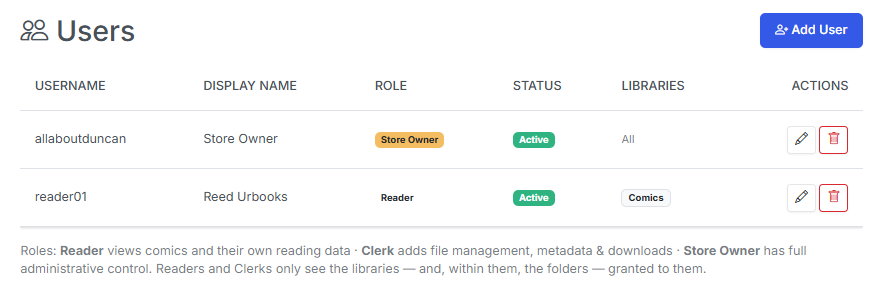
Settings → Users, listing every account with its role and status.
Adding or editing a user
Everything about an account lives in one modal, so you can create a user and grant their access in a single pass.
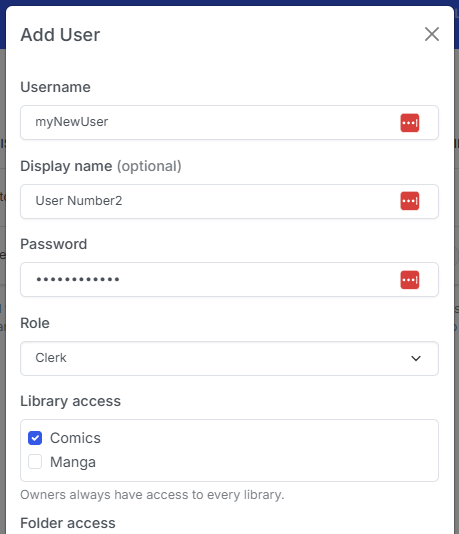
| Field | Description |
|---|---|
| Username | The login name. Must be unique. |
| Display Name | What the app shows in the header and on shared surfaces. Optional — falls back to the username. |
| Password | Set on creation, and changed here later. Stored werkzeug-hashed, never in plaintext. Leave blank when editing to keep the current password. |
| Role | Reader, Clerk, or Store Owner. Determines what the account can do. |
| Active | Unchecking this blocks login without deleting the account or its reading data. |
| Library access | Which libraries this account can see at all. New non-owner accounts get none by default. |
| Folder access | Which folders within each granted library the account can see. A granted library with no folders checked shows nothing. |
| API tokens | Mint or revoke API tokens for this account. Users can also do this themselves from My Account. |
Grants and roles are independent
Role decides what an account can do; grants decide which files it can do it to. A Clerk with no library grants can open the File Manager and see nothing in it.
Deactivating vs. deleting
| Action | What happens | Use it when |
|---|---|---|
| Deactivate (uncheck Active) | The account can no longer log in. Its reading history, positions, favorites, reading lists, and stats are all kept. Existing API tokens stop resolving. | Someone is leaving temporarily, or you want to suspend access without losing their data. |
| Delete | The account and its personal data are removed. | The account is genuinely finished with. |
Deactivation is reversible; deletion is not. When in doubt, deactivate.
Last Store Owner protection
You cannot lock yourself out
CLU refuses to demote, deactivate, or delete the last active Store Owner — the API returns cannot remove the last Store Owner (or cannot delete the last Store Owner) and the change is rejected.
If you want to hand the store over, promote the new owner first, then demote or delete the old one.
There is no in-app recovery for a forgotten owner password, so this protection is the only thing standing between you and a locked app. See First Run & Logging In.